
Have you ever wondered how your bank keeps your money safe online? Or how messaging apps like WhatsApp protect your private conversations? The answer lies in something called encryption keys. These are special digital codes that lock and unlock your sensitive information. But here’s the important part: these keys need to be completely random and unpredictable. Otherwise, bad actors could guess them and break into your data.
Think of it like this: imagine you’re hiding a treasure in your backyard. You could bury it in an obvious spot, like right next to the big oak tree. But that would make it easy for someone to find, right? Instead, you’d want to choose a spot that nobody could predict. That’s exactly what we do with secure random encryption keys. We create them in ways that nobody—not even the smartest computer—can guess.
In this guide, I’ll walk you through everything you need to know about generating secure encryption keys. Don’t worry if you’re not a tech expert. I’ll explain everything using simple, everyday language that anyone can understand.
What Exactly Is an Encryption Key?
Before we dive into how to create secure keys, let’s understand what they are. An encryption key is basically a long string of random numbers and letters. This string is used by computer programs to scramble your data (encryption) and unscramble it later (decryption).
For example, a simple encryption key might look like this: a7f3b9c2e8d1f4a6b3c7e9f2d5a8b1c4
This key works like a password, but it’s much longer and more complex. The more random and unpredictable this key is, the harder it becomes for hackers to break your security.
Why Does Randomness Matter So Much?

Here’s a story that illustrates why randomness is crucial. Back in 2008, security researchers discovered a major flaw in how some internet systems were creating encryption keys. The problem? These systems were using predictable patterns—things like the current time and date—to generate keys.
Hackers figured out this pattern. They could predict what keys would be created at certain times. As a result, they could break into supposedly “secure” systems. Thousands of websites and servers were at risk. This disaster happened simply because the keys weren’t truly random.
Therefore, when we create cryptographic keys, we need to use sources of randomness that are completely unpredictable. We call this “high-quality entropy.” Entropy is just a fancy word for randomness or unpredictability.
The Danger of Weak Random Number Generators
Many programming languages come with basic random number generators. For instance, functions like rand() in C or Math.random() in JavaScript seem convenient. However, these are not secure for creating encryption keys.
Why? These functions use mathematical formulas that appear random but are actually predictable. If someone knows the formula and the starting point (called a “seed”), they can predict all the “random” numbers that will come next. Consequently, any encryption key created this way is vulnerable.
Let me share another real-world example. In the early days of online gambling, some websites used basic random number generators for their games. Smart players figured out the patterns. They could predict what cards would be dealt or where the roulette ball would land. Similarly, weak random generators in security systems can be exploited by attackers.
What Is a CSPRNG and Why Do You Need One?
This brings us to CSPRNG, which stands for Cryptographically Secure Pseudorandom Number Generator. That’s quite a mouthful! Let’s break it down:
- Cryptographically Secure: Safe enough to use for encryption and security
- Pseudorandom: Looks random but is generated by a computer algorithm
- Number Generator: Creates random numbers
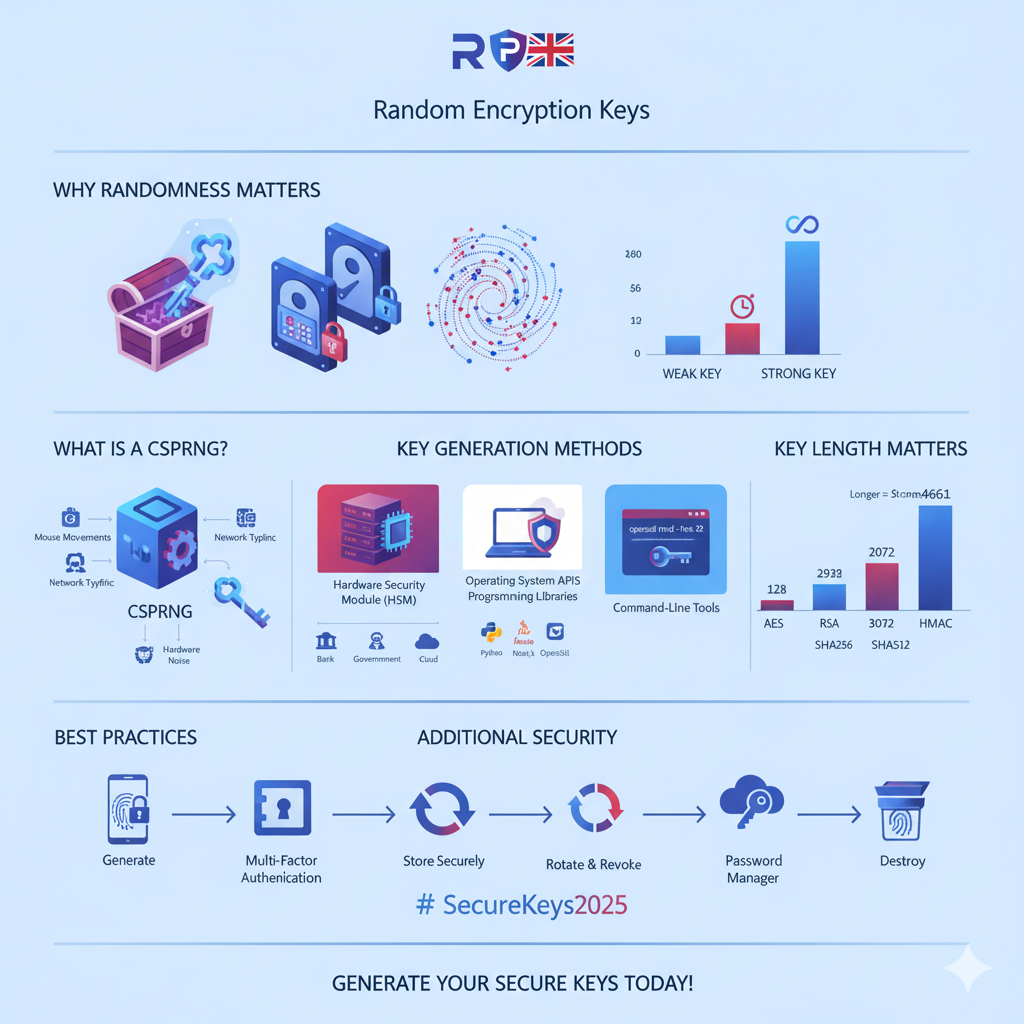
A CSPRNG is specifically designed to produce random numbers that are unpredictable, even if someone knows how the system works. These generators gather randomness from many unpredictable sources, like:
- Mouse movements on your computer
- Keyboard typing patterns
- Network traffic timing
- Hardware noise from your computer’s components
- Temperature fluctuations in your processor
Moreover, CSPRNGs mix all these sources together using complex mathematical operations. The result is a stream of truly unpredictable random numbers that can be used to create secure encryption keys.
Main Methods for Generating Secure Encryption Keys
Now, let’s explore the different ways you can actually generate secure keys. Each method has its own advantages, depending on your needs and technical expertise.
1. Hardware Security Modules (HSMs): The Gold Standard
A Hardware Security Module (HSM) is a physical device specifically built to generate and protect encryption keys. Think of it as a specialized safe for your digital keys.
HSMs use something called a True Random Number Generator (TRNG). Unlike computer algorithms that mimic randomness, a TRNG measures actual physical phenomena—like electronic noise, radioactive decay, or quantum effects—to create genuinely random numbers. As a result, the keys produced by HSMs are incredibly secure.
Furthermore, HSMs are tamper-resistant. If someone tries to break into the device physically, it destroys the keys inside. This makes them perfect for:
- Banks are processing millions of transactions
- Government agencies protecting classified information
- Large companies managing customer data
- Certificate authorities issuing digital certificates
However, HSMs are expensive. A single device can cost thousands of dollars. Therefore, they’re typically used by large organizations rather than individual developers or small businesses.
2. Operating System APIs: Built-In Security
Fortunately, modern operating systems provide secure random number generators that are good enough for most purposes. These systems collect cryptographic entropy from various sources on your computer and make it available through special interfaces.
For Linux and macOS users:
The operating system provides a special file called /dev/urandom (and also /dev/random). You can read random data directly from this file. The OS constantly gathers unpredictable information from hardware events, creating a pool of high-quality randomness.
For example, imagine every time you move your mouse, press a key, or your hard drive makes a noise, the system captures tiny measurements of timing and adds them to the entropy pool. Over time, this pool becomes extremely random and unpredictable.
For Windows users:
Windows provides a function called CryptGenRandom (and in newer versions, BCryptGenRandom). These functions work similarly, gathering randomness from various hardware and system events.
The great advantage of operating system randomness is that it’s already built into your computer. You don’t need to buy special hardware or install complicated software.
3. Programming Language Libraries: Easy and Safe
Most modern programming languages include libraries specifically designed for secure key generation. These libraries act as a bridge between your code and the operating system’s secure random number generator.
Let me give you practical examples for popular programming languages:
Python: The secrets Module
Python has a module called secrets that’s specifically designed for creating cryptographically secure random data. Here’s how simple it is:
python
import secrets
# Generate a secure random key (32 bytes = 256 bits)
encryption_key = secrets.token_bytes(32)
# Or get it as a hexadecimal string
hex_key = secrets.token_hex(32)
The secrets module automatically uses your operating system’s secure random generator. Therefore, you can trust that the keys it creates are truly unpredictable.
Java: SecureRandom Class
Java provides the SecureRandom class for generating AES encryption keys and other cryptographic values:
java
import java.security.SecureRandom;
public class KeyGenerator {
public static void main(String[] args) {
SecureRandom secureRandom = new SecureRandom();
byte[] key = new byte[32]; // 32 bytes = 256 bits
secureRandom.nextBytes(key);
// Now you have a secure encryption key
}
}
Similarly, SecureRandom uses the operating system’s cryptographic random number generator behind the scenes.
Node.js: crypto.randomBytes()
For JavaScript developers using Node.js, the built-in crypto module provides secure randomness:
javascript
const crypto = require(‘crypto’);
// Generate a 256-bit key
const encryptionKey = crypto.randomBytes(32);
// Convert to hexadecimal string
const hexKey = encryptionKey.toString(‘hex’);
Again, this function uses the operating system’s secure random source, ensuring your keys are unpredictable.
The key takeaway here is simple: always use your programming language’s built-in cryptographic libraries. These have been tested by thousands of developers and security experts. Never try to create your own random number generator for security purposes.
4. Command-Line Tools: Quick Key Generation
Sometimes you just need to generate a secure encryption key quickly, without writing any code. Command-line tools are perfect for this situation.
OpenSSL: The Swiss Army Knife of Cryptography
OpenSSL is a powerful toolkit available on most Linux and macOS systems (and can be installed on Windows). It can generate various types of keys with simple commands.
To generate a 256-bit AES key:
bash
openssl rand -base64 32
This command tells OpenSSL to generate 32 random bytes (256 bits) and display them in base64 format. The output might look something like: 7jK9mP4nQ8rT5vW2xY6zA1bC3dE4fG5hI6jK7lM8nO9p=
You can also generate keys in hexadecimal format:
bash
openssl rand -hex 32
OpenSSL uses your system’s secure random number generator, so the keys it creates are cryptographically secure.
Using /dev/urandom Directly
On Linux and macOS, you can also use the dd command to read random data:
bash
dd if=/dev/urandom bs=32 count=1 | base64
This reads 32 bytes of random data from /dev/urandom and converts it to base64 format.
These command-line methods are particularly useful when:
- Setting up servers
- Creating one-time keys for scripts
- Generating test data
- Quick prototyping
Understanding Key Lengths: How Long Should Your Key Be?
Not all encryption keys are created equal. The length of your key dramatically affects its security. Think of it like the difference between a two-digit PIN (00-99) and a six-digit PIN (000000-999999). The longer PIN has many more possible combinations, making it much harder to guess.
Common Key Lengths for Different Algorithms
For AES (Advanced Encryption Standard):
AES is one of the most widely used encryption algorithms. It supports three key lengths:
- 128 bits: Offers strong security for most applications. This key has approximately 3.4 × 10³⁸ possible combinations.
- 192 bits: Provides even stronger security, though it’s less commonly used.
- 256 bits: The strongest option, with approximately 1.1 × 10⁷⁷ possible combinations. This is typically called AES 256-bit key encryption.
For most purposes, AES 256-bit keys are recommended. Even with all the computing power in the world, it would take billions of years to try all possible combinations.
For RSA (Public Key Encryption):
RSA uses much longer keys because it’s based on different mathematics. Current recommendations are:
- 2048 bits: Minimum acceptable for most uses
- 3072 bits: Better security
- 4096 bits: Maximum security for highly sensitive data
Anything less than 2048 bits is considered weak and should not be used for new systems.
For HMAC Keys:
When generating HMAC secret keys (used for message authentication), you should typically use keys at least as long as the hash output. For example:
- HMAC-SHA256: Use at least 256-bit keys (32 bytes)
- HMAC-SHA512: Use at least 512-bit keys (64 bytes)
Best Practices for Secure Key Generation
Now that you understand the methods and key lengths, let’s discuss the essential practices you should always follow when generating encryption keys.
Never Use Non-Secure Random Number Generators
I cannot stress this enough: never, ever use basic random number generators for creating cryptographic keys. Functions like rand(), random(), Math.random(), or mt_rand() are not secure. They’re fine for games, shuffling cards, or picking random colors, but they’re dangerous for security.
Instead, always use:
- Your operating system’s secure random generator (/dev/urandom, CryptGenRandom)
- Your programming language’s cryptographic library (secrets, SecureRandom, crypto.randomBytes())
- Established tools like OpenSSL
Never Roll Your Own Crypto
There’s a famous saying in computer security: “Don’t roll your own crypto.” This means you should never try to invent your own encryption algorithms or random number generators.
Why? Because creating secure cryptography is incredibly difficult. Professional cryptographers spend years studying and testing their algorithms. Even experts make mistakes. Many clever-sounding encryption schemes have been broken shortly after being published.
For instance, in 2000, a company created their own “unbreakable” encryption system for DVDs. It was broken in less than a week. The company thought they were being smart by creating something unique. Instead, they created something vulnerable.
Therefore, always use well-established, peer-reviewed libraries like:
- OpenSSL
- Libsodium
- Bouncy Castle
- Microsoft’s CryptoAPI
- Apple’s Security Framework
These libraries have been examined by thousands of security experts and have stood the test of time.
Follow the Key Management Lifecycle
Generating a key is just the first step. Throughout its lifetime, a cryptographic key goes through several stages. Managing these stages properly is called key lifecycle management.
Stage 1: Generation
This is where we are now—creating the key using secure methods. As we’ve discussed, this requires using CSPRNGs or hardware security modules.
Stage 2: Storage
Once you’ve generated a key, you need to store it safely. Never, ever hardcode keys directly into your source code. If your code is ever leaked or stolen, your keys go with it.
Instead, store keys in:
- Environment variables (for simpler applications)
- Key vaults or key management services
- Cloud KMS (Key Management Service) like AWS KMS, Azure Key Vault, or Google Cloud KMS
- Hardware security modules for maximum security
- Encrypted configuration files (where the encryption key is stored separately)
Stage 3: Rotation
Keys shouldn’t last forever. Regularly changing your keys (called key rotation) limits the damage if a key is ever compromised. Additionally, it reduces the amount of data encrypted with any single key, making cryptanalysis harder.
How often should you rotate keys? It depends on:
- How sensitive your data is
- Industry regulations and compliance requirements
- Your organization’s security policy
Many organizations rotate keys every 90 days for highly sensitive systems, or annually for less critical systems.
Stage 4: Revocation
Sometimes you need to stop using a key immediately—perhaps you suspect it’s been compromised, or an employee with access has left the company. Having a clear process for key revocation is essential.
Stage 5: Destruction
When a key is no longer needed, it must be securely destroyed. Simply deleting a file isn’t enough—the data might still be recoverable from your hard drive. Proper secure key destruction involves:
- Overwriting the memory or storage where the key was kept
- Using secure deletion tools
- In the case of HSMs, using built-in destruction features
- Keeping audit logs of when keys were destroyed
Use Appropriate Key Derivation When Needed
Sometimes you need to create encryption keys from passwords or other human-provided input. For example, when encrypting a file with a user’s password, you can’t use the password directly as a key—it’s not long enough and not random enough.
Instead, you use a Key Derivation Function (KDF). These functions take your password and stretch it into a proper encryption key using special algorithms. Common KDFs include:
PBKDF2 (Password-Based Key Derivation Function 2): An older but still widely used standard. It repeatedly applies a hash function to your password, making it slow and difficult for attackers to crack.
HKDF (HMAC-based Key Derivation Function): Used when you already have some randomness (like a shared secret) and need to derive additional keys from it.
Argon2: A newer KDF specifically designed to resist attacks using specialized hardware. It’s currently considered the best choice for password-based key derivation.
When using a KDF, you should also add a random salt. A salt is a random value added to your password
before deriving the key. This ensures that even if two users choose the same password, their encryption keys will be different.Real-World Examples of Secure Key Generation
Let me walk you through some practical scenarios to show you how this all comes together.
Example 1: Creating an AES Key for File Encryption
Imagine you’re building a simple application to encrypt files on your computer. Here’s how you’d generate a secure AES 256-bit key:
Using Python:
python
import secrets
# Generate a 256-bit key
encryption_key = secrets.token_bytes(32)
# Save it safely (never hardcode!)
with open(‘/secure/location/key.bin’, ‘wb’) as key_file:
key_file.write(encryption_key)
This creates a truly random 32-byte (256-bit) key suitable for AES encryption. Remember to store the key file in a secure location with proper access controls.
Example 2: Generating JWT Secret Keys
If you’re building a web application, you might use JSON Web Tokens (JWT) for user authentication. JWTs need to be signed with a secret key to prevent tampering.
Using Node.js:
javascript
const crypto = require(‘crypto’);
const fs = require(‘fs’);
// Generate a secure JWT secret (at least 256 bits)
const jwtSecret = crypto.randomBytes(32).toString(‘base64’);
// Store it in environment variables or a secure config file
console.log(‘Add this to your .env file:’);
console.log(`JWT_SECRET=${jwtSecret}`);
Never share this secret or commit it to version control systems like Git.
Example 3: Generating SSH Keys
When connecting to remote servers, you use SSH keys for authentication. Here’s how to generate secure SSH keys:
Using the command line:
bash
ssh-keygen -t ed25519 -C “[email protected]”
This command uses the Ed25519 algorithm, which is based on elliptic curve cryptography and provides excellent security with shorter keys. The tool automatically uses your system’s secure random number generator.
Alternatively, you can use RSA with a 4096-bit key:
bash
ssh-keygen -t rsa -b 4096 -C “[email protected]”
The tool will save your keys in ~/.ssh/ directory and prompt you for a passphrase. Always use a strong passphrase to add an extra layer of security.
Compliance and Standards You Should Know
If you’re building systems that handle sensitive data—like credit card numbers, health records, or personal information—you need to follow specific security standards.
NIST Guidelines
The National Institute of Standards and Technology (NIST) publishes guidelines for cryptographic key generation and management. Their recommendations are widely followed across industries.
According to NIST, you should:
- Use approved random number generators (like those we’ve discussed)
- Choose appropriate key lengths (they recommend 256 bits for symmetric encryption)
- Implement proper key management practices
- Regularly update your cryptographic systems
FIPS Compliance
FIPS (Federal Information Processing Standards) 140-2 and 140-3 specify requirements for cryptographic modules used by the U.S. federal government. If you’re working with government agencies, your key generation methods must be FIPS-compliant.
FIPS-compliant systems must use validated cryptographic algorithms and random number generators. Most modern operating systems and cryptographic libraries provide FIPS modes.
PCI DSS for Payment Systems
If you handle credit card data, you must comply with PCI DSS (Payment Card Industry Data Security Standard). This standard requires:
- Strong cryptography for storing and transmitting cardholder data
- Secure key generation using approved methods
- Key management procedures including key rotation and destruction
- Regular security audits
Common Mistakes to Avoid
Even with all this knowledge, it’s easy to make mistakes. Let me highlight some common pitfalls so you can avoid them.
Mistake 1: Using Timestamps as Seeds
Some developers think they’re being clever by using the current time as a seed for randomness:
python
# DON’T DO THIS!
import random
import time
random.seed(time.time())
key = random.randint(0, 1000000)
This is incredibly insecure. Timestamps are predictable—an attacker can easily guess what time your key was generated and recreate it.
Mistake 2: Storing Keys in Version Control
Never commit encryption keys to Git, SVN, or any version control system. Even if you delete the commit later, the keys remain in the history. Instead, use environment variables or separate configuration files that are listed in your .gitignore file.
Mistake 3: Reusing Keys Across Different Purposes
Don’t use the same key for multiple purposes. For example, don’t use your database encryption key to also sign JWTs. Each purpose should have its own unique key. This way, if one key is compromised, your entire system doesn’t collapse.
Mistake 4: Not Having a Backup Plan
What happens if you lose your encryption keys? All data encrypted with those keys becomes permanently inaccessible. Always have a secure backup strategy, such as:
- Storing encrypted backups of keys in multiple locations
- Using key escrow services (for certain scenarios)
- Implementing key recovery procedures
However, be careful—making backups also creates additional security risks. Balance accessibility with security based on your specific needs.
Testing Your Key Generation
How do you know if your encryption keys are truly random and secure? There are several ways to test.
Statistical Randomness Tests
Security researchers have developed sophisticated tests to check if data appears random. One famous suite is called the NIST Statistical Test Suite. It performs multiple tests looking for patterns, biases, or predictability.
However, passing these tests doesn’t guarantee security. A sequence can appear random statistically but still be predictable if you know the algorithm that generated it. This is why using established CSPRNGs is so important.
Entropy Assessment
You can check how much entropy your system has available:
On Linux:
bash
cat /proc/sys/kernel/random/entropy_avail
This shows the current entropy pool size. A healthy system should have at least 1000-2000 bits available.
On other systems, there are tools available to monitor entropy, though the methods vary.
Code Review and Security Audits
The best way to ensure your key generation is secure is to have security experts review your code. They can spot subtle mistakes that automated tests might miss. Additionally, regular security audits help ensure you’re following best practices and haven’t accidentally introduced vulnerabilities.
The Future of Key Generation
Technology keeps advancing, and so do methods for generating secure keys. Let me briefly touch on some emerging trends.
Quantum Random Number Generators
Quantum physics provides true randomness based on fundamental properties of nature. Quantum random number generators measure quantum phenomena—like photon detection or quantum tunneling—to produce random numbers that are theoretically perfect.
Several companies now offer quantum random number generators as products. While they’re still expensive and specialized, they may become more common as quantum technology matures.
Post-Quantum Cryptography
Current encryption algorithms could potentially be broken by quantum computers in the future. Researchers are developing post-quantum cryptography—new algorithms that would resist even quantum attacks. These new algorithms will require new approaches to key generation as well.
While practical quantum computers are still years away, organizations handling very long-term secrets (like government archives) are already thinking about quantum-resistant encryption.
Conclusion:
Generating secure random encryption keys might seem complicated, but it doesn’t have to be. The most important lessons to remember are:
- Always use cryptographically secure random number generators—never basic random functions
- Use established libraries and tools—don’t invent your own crypto
- Choose appropriate key lengths—256 bits for AES, 2048+ bits for RSA
- Follow proper key management practices throughout the key’s lifecycle
- Store keys securely—never hardcode them or commit them to version control
- Rotate keys regularly to limit exposure
- Test your implementation and have security experts review it
The good news is that modern operating systems and programming languages make secure key generation easy. You don’t need expensive hardware security modules for most applications—the built-in tools are excellent.
Just remember my friend’s cautionary tale. He once built a secure messaging app but used a weak random number generator for encryption keys. When security researchers tested it, they cracked the encryption in minutes. He had to rebuild everything from scratch using proper CSPRNGs. Learn from his mistake—do it right the first time.
Security doesn’t have to be intimidating. With the knowledge you’ve gained from this guide, you can confidently generate secure encryption keys for your applications. Stay safe, stay secure, and always keep learning. The world of cryptography is fascinating, and there’s always more to discover.
Remember: in security, paranoia is a feature, not a bug. Question everything, trust but verify, and never assume your keys are secure unless you’ve followed proper practices. Your users’ data depends on it.