
The Definitive Guide
Introduction:
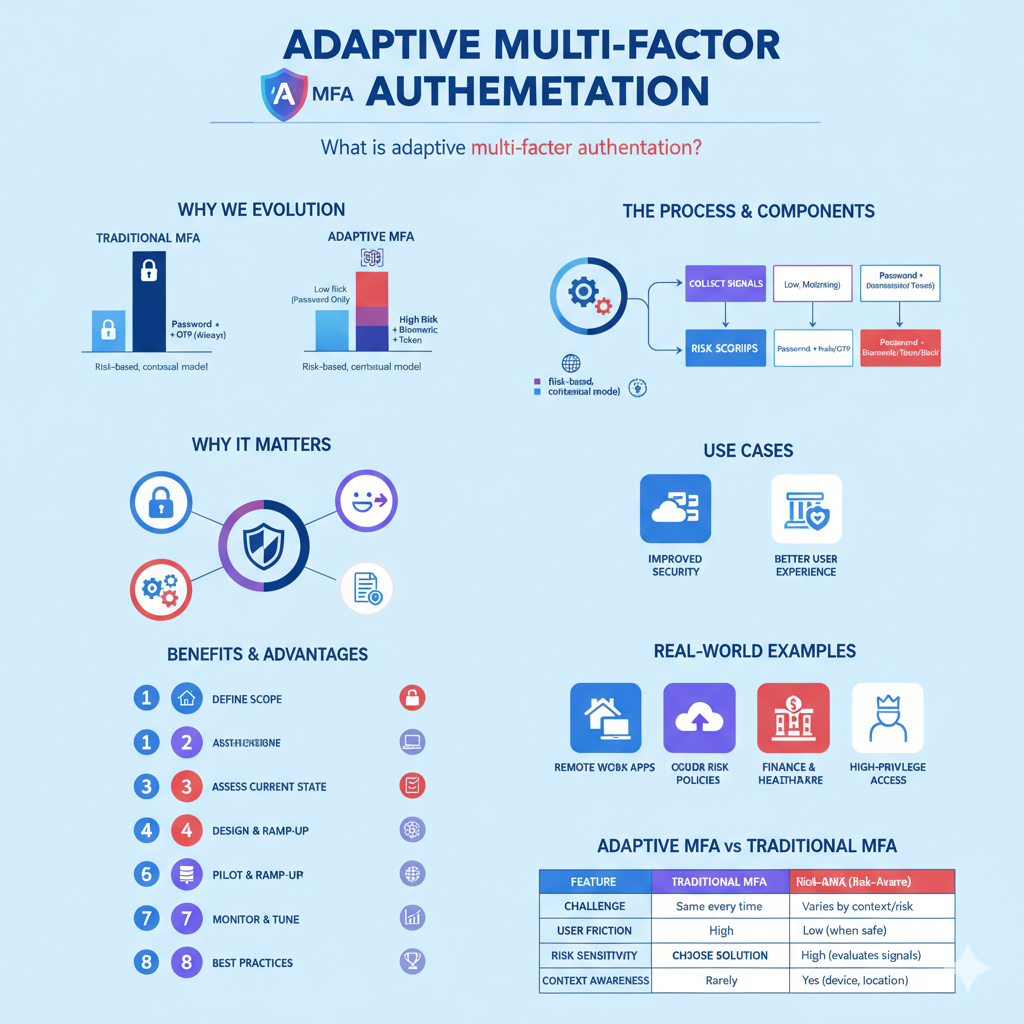
In an era where cyber-attacks and identity theft are becoming everyday headlines, security measures must evolve beyond the traditional. Enter Adaptive Multi‑Factor Authentication (often abbreviated as adaptive MFA). At its core, adaptive MFA is a smarter way of verifying someone’s identity — it uses more than just a password or simple “two-factor” check. Instead, it looks at the context, behaviour, risk and other signals to decide how much verification is needed. This means in some low-risk cases the user may log in with minimal friction — while in higher-risk scenarios extra challenges kick in. For example, if someone logs in from a new device or a foreign country, the system might ask for a biometric or security token.
According to a definition by CyberArk, “Adaptive Multi-factor Authentication is a method for using contextual information and business rules to determine which authentication factors to apply to a particular user in a particular situation.” CyberArk And as the team at Silverfort explains, “Unlike traditional MFA, adaptive MFA evaluates each login attempt to determine the level of risk before requiring additional authentication factors.”
In everyday language: imagine walking into your office building. If you use your employee badge at the usual time via a familiar door, you just walk in. But if you try to enter out-of-hours, from a different location, or using someone else’s badge, the security system asks you to show a second ID, perhaps biometric, or restricts access entirely. That’s how adaptive MFA works in the digital world.
Over the next sections we’ll break down what adaptive authentication is, how it works, why it matters, step-by-step implementation guide, and best practices and real-world use-cases to give you a clear, practical understanding of this next-gen solution.
The Evolution – Why We Need Adaptive MFA (and How It Differs from Traditional MFA)

1.1 Traditional MFA vs Adaptive MFA
First off, let’s clarify what standard multi-factor authentication (MFA) is. In many organisations, when you log in you type a password (something you know), and then you must supply an OTP from your phone or use a hardware token (something you have). That’s much better than password-only. But it still applies the same level of challenge to everyone, everywhere, regardless of risk.
By contrast, adaptive MFA introduces a risk-based, contextual model: it analyses factors like device, location, user behaviour, time, IP reputation, etc., and accordingly decides whether to require more authentication or allow less. TechTarget describes this: “Adaptive multifactor authentication (MFA) is a security mechanism intended to authenticate and authorize users through a variety of contextual authentication factors.”
1.2 Why the change matters
Why is this needed now? Well:
- Cyber threats are more sophisticated. Attackers don’t just guess passwords anymore; they use phishing, account takeover, credential-stuffing, device spoofing. Traditional MFA may help, but if it’s always applied in a rigid way, it can either frustrate users or be circumvented by smart attackers.
- User experience matters. Enterprises don’t just want to lock everything down; they also want to keep operations smooth. If users get challenged every time, productivity suffers. Adaptive MFA helps balance security and convenience.
- Work patterns are more fluid. With remote work, cloud apps, mobile access, VPNs, BYOD, users log in from many places/devices — the “usual” is no longer always “office and trusted machine”. Adaptive authentication responds to this changing environment.
- “Zero trust” architectures are gaining traction — where access is continuously assessed rather than implicitly trusted. Adaptive MFA aligns nicely with this new model.
As Silverfort summarises: “The goal of adaptive MFA is to improve the user experience by reducing authentication friction for low-risk logins while still providing strong security for high-risk logins.”
1.3 Terminology: risk-based authentication, behavioural authentication, context-based authentication
You’ll see many related terms: risk-based authentication, contextual authentication, behavioural authentication, dynamic multi-factor authentication and AI-powered MFA. These are largely overlapping with adaptive MFA.
- Risk-based authentication emphasises assigning a risk score to a login attempt and stepping up when risk is high.
- Context-based authentication emphasises using information such as geolocation, device, time of day, network, etc.
- Behavioural authentication emphasises patterns of user behaviour (typing speed, device usage, login time) to detect anomalies.
- Intelligent/AI-powered MFA emphasises the use of machine-learning to detect these patterns and make decisions.
So, when you see phrases like “next-gen MFA”, “adaptive MFA security”, “real-time adaptive MFA”, they’re often referring to this richer, smarter model of authentication.
How Adaptive MFA Works – The Process and Components
In this section we’ll walk through the mechanics: what does an adaptive MFA workflow look like? What signals are used? What decisions are made? And how are these operationalised?
2.1 Core signals and contextual factors
An adaptive MFA system collects and evaluates a variety of signals when a login or access attempt occurs. Here are the common ones:
- Device attributes: Is this device recognised? OS version, browser version, device fingerprint.
- Geolocation: Where is the login coming from? Is it a usual location for this user? Is there an “impossible travel” between logins (e.g., login from New York then after 10 minutes from Moscow) ?
- IP address & network reputation: Is the IP address known/whitelisted? Is it flagged for suspicious activity?
- Time of day, day of week: Are they logging at a time that matches their usual pattern? Off-hours access may indicate risk.
- User behaviour / history: Have they logged in from this device before? Are they using typical apps or making typical requests? Any anomaly in their pattern?
- Transaction or resource context: What is the user trying to do — simple access? Or access sensitive data? For a high-risk action, stronger authentication may be triggered.
- Threat intelligence / external signals: Known malicious IPs, device blacklists, recent breaches, etc.
2.2 Risk-scoring and decision logic
Once signals are gathered, the system typically computes a “risk score” or “confidence level”. For example, Auth0 Adaptive MFA describes how it calculates an overall confidence score based on factors like new device, impossible travel, untrusted IP.
If the risk score is low (meaning: user is logging in under familiar conditions / standard device / usual location), then the system might allow the login with minimal extra authentication.
If the risk score is moderate or high (new device, abroad, unusual location/time, suspicious network), then the system “steps up” authentication: requiring extra factor(s). In extreme cases it might block access entirely.
This decision logic is often driven by policies or rules set by the organisation: for example “if risk score > 80 then require biometric + token”, “if risk score between 50–80 then require push notification”, “if risk score < 30 allow password only”.
2.3 Authentication factors and methods
Depending on the risk assessment, different factors may be required. Some possible factors:
- Something you know: password, PIN.
- Something you have: smartphone app push notification, hardware token, smart card.
- Something you are: biometric (fingerprint, face, voice).
- Contextual or possessionless factors: device fingerprint, geolocation, behavioural biometrics (typing rhythm, mouse movement) — these aren’t always visible to the user but feed into the risk assessment.
- Passwordless or single-sign-on (SSO) workflows may also be part of the chain, especially in modern identity setups.
2.4 Workflow example (anecdote)
Let’s illustrate with a story:
Imagine Sarah, a marketing manager at a global company. Every weekday at around 9 am she logs into her desktop in the London office using her usual laptop and from the office network — things are familiar. Her company uses adaptive MFA: because this login matches her usual pattern (recognised device, common IP, regular time), the system scores it as low risk and she only has to enter her password—no extra step.
A few weeks later, Sarah travels to Singapore for a conference. She tries to log in from a hotel WiFi using a personal laptop she seldom uses. The adaptive MFA system detects: unfamiliar device, unfamiliar location, network that’s public/hotel. It gives a higher risk score and prompts her for a second factor: e.g., a push notification to her mobile phone or biometric verification. She completes that and logs in.
Then one evening, Sarah’s credentials get phished but the attacker tries to log in from a remote country at 3 am local time, using a device never seen before. The adaptive MFA system flags this as extremely high risk and blocks access entirely (or forces the strongest authentication factor such as hardware key or admin approval).
In this way, the company balances ease for Sarah in low-risk contexts (morning office login) with strong protection in higher-risk contexts (abroad or unusual time).
This scenario shows adaptive MFA in action — adjusting the login challenge based on context, behaviour and risk.
2.5 Integration into Identity & Access Management (IAM)
Adaptive MFA is rarely a stand-alone tool; it’s usually part of a broader identity and access management (IAM) ecosystem. It ties into SSO, directory services, access gateways, cloud apps, VPNs, and compliance workflows. Vendors like Okta highlight how their adaptive MFA integrates with existing infrastructure and gives “a simple way for employees and customers to access the tools they need” while security is enhanced.
Benefits & Advantages of Adaptive MFA

Now that we understand how adaptive authentication works, let’s review why organisations are adopting it — both for security and for business/UX reasons.
3.1 Improved security & risk reduction
- By using real-time context and behaviour, adaptive MFA can detect and thwart sophisticated threats (credential-stuffing, account takeover, device spoofing) better than traditional MFA.
- For example, Silverfort notes that adaptive MFA “helps prevent unauthorized access by requiring multiple methods to verify users’ identities … By combining multiple factors … the solution creates an additional layer of security that is more difficult for cyber-criminals to breach.”
- Risk aware strategies: you allocate stronger verification to high-risk logins, thus optimising your security posture.
3.2 Better user experience & reduced friction
- If every login always required multiple factors, users would get fatigued and frustrated. Adaptive MFA gives fewer hurdles for low-risk logins while applying stricter checks only when needed.
- As Stytch explains: “Adaptive MFA improves productivity by reducing the friction of traditional MFA systems. Users logging in from recognized devices or during regular hours face fewer authentication challenges, allowing faster access…”
3.3 Operational flexibility & cost-effectiveness
- You can apply different policies for different user groups, access types, devices, apps or locations.
- By reducing unnecessary MFA prompts, you save on support costs (e.g., fewer help‐desk calls about lost tokens).
- As organisational environments change — remote work, cloud apps, BYOD — adaptive MFA scales better than rigid MFA.
3.4 Compliance & modern security architectures
- Many regulatory frameworks and frameworks for “zero trust” architectures recognise that traditional perimeter-based models aren’t enough. Adaptive MFA supports “access control based on context” which aligns with modern good practice.
- It helps organisations meet standards for identity protection, safeguarding sensitive data, and reducing exposure to breaches.
3.5 Business benefit summary
In summary, the advantages of adaptive authentication include:
- stronger protection for critical assets;
- streamlined login experience for users;
- ability to tailor security for roles, devices, apps;
- future-proofing for hybrid/remote/cloud environments;
- supports frameworks like zero-trust and continuous authentication.
Adaptive MFA Use Cases & Real-World Examples
Understanding specific situations helps make this concept concrete. Here are some common use-cases where adaptive MFA shines.
4.1 Remote work / VPN access
With many employees working from home, coffee shops or abroad, organisations need to secure VPN and cloud access. In this scenario, adaptive MFA can apply stricter checks when a user logs in from a public WiFi or foreign location, but minimal friction when they log in from a known home computer. For example, CyberArk gives the example of an information worker logging in from home (trusted computer) vs traveling (untrusted IP) — requiring stronger MFA when traveling.
4.2 Cloud apps and SaaS
When users access cloud-based applications (SaaS), the login origin may vary widely. Adaptive MFA ensures that high-risk access (e.g., from unmanaged device or unusual location) triggers additional authentication, while low-risk use-cases remain smooth.
4.3 Banking, finance, healthcare
Industries with strong compliance demands and high risk of fraud tend to benefit greatly. For instance, if a bank customer logs into their mobile banking from their usual device and location, they may have simple access; but if the login is from a new country, new device, at odd hours, adaptive MFA might require biometrics or hardware token. The contextual signals help detect or block phishing or account takeover attempts.
4.4 Role-based or high-privilege access
Administrative roles or users with access to sensitive systems may always face stronger checks. For example, in a retail environment a regular sales associate might log into POS with username/password, but an IT admin logging in to upgrade software might need password + token + biometric. CyberArk describes such role-based adaptive MFA.
4.5 Onboarding and stepped trust
Adaptive MFA can be used to gradually increase trust. For example, a new user may face stricter controls until their behaviour becomes normalised; after a baseline is established, the system may reduce friction for standard logins.
4.6 Fraud detection and behavioural anomalies
Adaptive MFA isn’t just about login; some systems extend to detect anomalous behaviour within sessions (continuous authentication). For example, behaviour patterns, device drift, typed content, user interactions may be fed into risk scoring engines. Research shows increased use of behavioural biometrics and machine learning in this field.
4.7 Example story
Suppose an e-commerce startup. One of their customers, Alice, logs in every morning from her phone via her home WiFi in Karachi, Pakistan. The login is smooth: password + one-time auth, recognised device, typical location. One day, an attacker in a foreign country tries to log in using Alice’s stolen password. The system sees a new device, foreign location, unusual time. Risk score jumps. The system triggers advanced authentication: push notification to Alice’s phone, requiring her biometric fingerprint. She refuses (it wasn’t her) and the attempt gets blocked. The startup thus prevents an account takeover without imposing friction on Alice’s regular daily access.
Meanwhile, Bob, a frequent traveller, logs in from his laptop abroad. The system detects his device but new country — so prompts a push notification + token. He completes it easily and continues. The business enjoys low friction access for Bob and strong security for unexpected attempts.
Step-by-Step Guide to Implementing Adaptive MFA

Here’s a practical step-by-step guide to help organisations implement an adaptive MFA system (also called “adaptive authentication tools”, “adaptive MFA software”, “adaptive MFA enterprise solution”). Whether you are starting from traditional MFA or building fresh, these steps will help.
Step 1: Define your scope & objectives
- Identify which applications, systems and user groups will be protected by adaptive MFA. Is it all users? Just remote access? Cloud apps?
- Clarify business goals: reduce account takeovers, streamline user login experience, comply with regulation, support remote work.
- Identify key metrics: login failures, phishing incidents, user support tickets, time-to-access, authentication friction.
Step 2: Assess current state
- What authentication methods do you already use? (passwords, MFA, tokens, biometrics)
- Where are your high-risk access points? (VPN, administrative portals, cloud services)
- What devices and contexts are users using? On-site vs remote, managed vs unmanaged devices.
- What visibility and logs do you have? Do you have device fingerprinting, user behaviour logs, geolocation logs?
Step 3: Design your risk model & policies
- Define risk signals and thresholds. Examples: new device = +20 risk points; login from untrusted country = +30; odd time/day = +10.
- Create tiers of risk (low, medium, high) and map required authentication factors for each.
- Low risk: password only or minimal factor
- Medium risk: password + push notification or OTP
- High risk: password + hardware token + biometric
- Low risk: password only or minimal factor
- Define business rules: e.g., “admins always use high-risk paths”, “remote device untrusted location always triggers step-up”.
- Decide device recognition: managed vs unmanaged; whitelist/blacklist of devices or networks.
Step 4: Choose and integrate the technical solution
- Select an adaptive MFA vendor/solution (e.g., Okta Adaptive MFA, Auth0 Adaptive MFA, Silverfort, OneLogin, etc). Check for features: risk scoring, device profiling, behavioural analytics, API/integration support.
- Integrate with your identity and access management (IAM) system, SSO, VPN, cloud apps and network access gateway.
- Ensure you can capture necessary context signals: IP address, device fingerprint, geolocation, login time, user role.
- Enable required authentication factors: SMS/OTP, push notifications, hardware tokens (FIDO2), biometrics, security keys.
- Set up a policy engine or rules engine to drive decisions based on risk score and context.
Step 5: Pilot and ramp-up
- Start with a small user group or low-risk applications. Monitor behaviour, risk scoring, success/failure rates.
- Gather feedback: Are users frustrated? Are false positives too high (i.e., many logins forced extra factors when not needed)? Are false negatives too high (risky logins allowed with minimal challenge)?
- Adjust thresholds, refine rules, improve device recognition and baseline profiling.
Step 6: Extend to full deployment
- Roll out to all users and applications per your scope.
- Monitor continuously: login success/failure, user support tickets, security incidents, authentication latency.
- Provide user training and support: explain why extra factors may be asked sometimes (context matters) to reduce confusion and friction.
Step 7: Continuous monitoring, tuning & analytics
- Use analytics dashboards (“adaptive MFA dashboard”) to view authentication events, risk scores, blocked attempts, user friction metrics.
- Refine risk signals over time. For example, if many legitimate logins from a certain device or location get challenged, add that as a trusted device or location.
- Update policies as the threat landscape evolves (new attack vectors, new regulation, new device types).
- Ensure fallback and recovery mechanisms are solid (e.g., lost hardware token, biometric failure).
- Conduct periodic reviews for compliance, audit trails, user behaviour shifts, new business use-cases.
Step 8: Best practices & governance
- Use least-privilege and role-based access along with adaptive MFA (so higher privilege = stricter checks).
- Maintain user trust: keep friction as low as possible for normal users, transparent communication.
- Have incident response: when adaptive MFA blocks a suspicious login, notify user/admin, trigger investigation.
- Backup factor: always ensure there’s a fallback method (e.g., help-desk token or biometric alternative) to prevent lock-out.
- Stay current with standards: e.g., FIDO2/WebAuthn, biometric best-practices, zero-trust architecture.
Adaptive MFA Best Practices & Implementation Tips
Having implemented adaptive MFA, what are the best practices and tips to maximise benefit while minimising downsides?
6.1 Start simple, escalate gradual
Don’t over-complicate from day one. Start with a handful of key risk signals (device recognition + geolocation) and then gradually add more complex factors like behavioural biometrics, time-of-day, transaction context.
6.2 Maintain balance: security vs user experience
Friction kills productivity. Always evaluate whether the extra step is justified by the risk. One of the advantages of adaptive MFA is reducing unnecessary MFA prompts — use it to your advantage. As Stytch writes: “Adaptive MFA … allows trusted devices to log in with minimal friction, while adding extra layers of security for unfamiliar or suspicious activity.”
6.3 Device and location-profiling
Maintain a baseline of trusted devices and common login locations for each user. New or unknown device/location = higher risk. Recognise managed vs unmanaged devices.
Whitelist trusted IP addresses/networks where possible.
Regularly refresh trusted device lists to ensure obsolete or compromised devices are removed.
6.4 Use strong authentication factors for high-risk paths
When risk is high, don’t compromise: use hardware tokens (FIDO2 security keys), biometrics, push notifications rather than just SMS (since SMS is vulnerable to SIM-swapping).
Ensure fallback methods are secure and audited.
6.5 Use clear, transparent user-communication
When users are asked for extra authentication, explain why. E.g., “We noticed you’re logging in from a new device – please verify your identity to maintain account security.” This builds trust and avoids frustration.
Provide training documents or FAQs about “why you might be asked for extra verification”.
6.6 Analytics & continuous tuning
Monitor blocked/allowed logs, user support tickets, login failures, false positives.
Tune risk-score thresholds to reduce false-positives without sacrificing security.
Use dashboards that display metrics such as “number of step-up authentications”, “login friction vs login success”, “threat events triggered”.
6.7 Policy governance & audits
Have defined policies and documentation around access, authentication factor tiers, risk levels.
Audit periodically: ensure policies are being followed, logs are maintained, exceptions are tracked.
Ensure compliance with regulatory requirements (e.g., your industry’s data protection rules, identity-access standards).
6.8 Integrate with broader security ecosystem
Adaptive MFA should not exist in a silo. Integrate with your IAM, SSO, endpoint management, network access control, SIEM/monitoring systems. This allows contextual signals like device posture, endpoint health, network trust to feed into your risk scoring.
Also, adaptive MFA works hand-in-hand with zero-trust models: treat every access attempt as if it’s untrusted, and continuously evaluate risk.
6.9 Prepare user recovery and fallback
What happens if a user loses their device or hardware token? Make sure you have a secure fallback method (help-desk escalation, secondary token, biometric fallback) and that you manage this process tightly (to avoid social-engineering bypasses).
6.10 Stay aware of evolving threat vectors
Attackers adapt: device spoofing, credential-stuffing, chained compromise, machine-learning based attacks. Ensure your adaptive MFA solution and policies evolve accordingly (e.g., monitor device fingerprint tampering, new geolocation anomalies, unusual user behaviour patterns). Research shows increasing reliance on machine learning in adaptive authentication systems.
Challenges & Considerations When Deploying Adaptive MFA

While adaptive MFA offers many advantages, organisations should be mindful of common challenges and how to mitigate them.
7.1 Data privacy and GDPR/compliance
When you collect behavioural and contextual data (device fingerprinting, location, user behaviour), you must ensure you comply with privacy regulations (e.g., GDPR, NIST recommendations). Clear user consent, data minimisation, transparent policies and logs are required.
Adaptive MFA tools often feature analytics dashboards, so you must ensure user data is handled securely and appropriately.
7.2 False positives / user friction
If your risk model is too aggressive, legitimate users may be challenged too often — causing frustration, support tickets, productivity loss.
Conversely, being too lenient may allow risky logins. Finding the right threshold is key.
7.3 Device recognition and management complexity
Tracking which devices are trusted/untrusted can become complex, especially when users use multiple devices, bring personal devices (BYOD), or frequently travel. Ensuring device-fingerprinting is accurate and secure is important.
7.4 Implementation complexity and cost
Some organisations may lack the internal expertise or infrastructure to deploy and tune adaptive MFA prematurely. Setting up analytics, rules engine, behavioural baselining takes time.
Integration with IAM, SSO, cloud apps, VPNs must be planned.
7.5 Legacy systems and application compatibility
Older apps may not support modern authentication factors or integrate easily with risk engines. Some cloud or on-premise services might require custom connectors or legacy authentication methods.
7.6 User education & change management
Users may be surprised when they are asked for extra verification even though they “always log in”. Explaining why adaptive MFA asks for stronger steps sometimes is important to maintain trust.
7.7 Security of the fallback path
If you use strong authentication for high-risk cases, make sure weaker fallback methods are not being abused (e.g., help-desk resets, SIM swap vulnerability). The weakest link often becomes the attacker’s target.
Adaptive MFA vs Traditional MFA – Key Differences
Let’s compare adaptive MFA and traditional MFA / fixed MFA side-by-side so you can clearly see why the “adaptive” label matters.
| Feature | Traditional MFA | Adaptive MFA (Risk-Aware) |
| Authentication challenge | Same challenge every login (e.g., password + OTP) | Challenge varies based on context, risk, device, user behaviour |
| Friction for user | High for every login | Low for familiar contexts, higher only when needed |
| Risk sensitivity | Minimal – treats all logins equally | High – evaluates risk signals, adjusts accordingly |
| Device/location awareness | Rarely | Yes — device profile, geolocation, IP reputation, etc. |
| Behavioural/continuous checks | Often none or minimal | Yes — behaviour, anomalies, context considered |
| User experience optimisation | Limited | Strong — aims for smoother experience when safe |
| Alignment with zero-trust / modern architecture | Less so | Very good — aligns with zero-trust, cloud-native, remote access |
| Support for high-risk actions | Same as low-risk | Can require stronger factors for sensitive actions |
In short: adaptive MFA evolves the concept of multi-factor authentication by making it context-aware, risk-driven, dynamic, and user-friendly.
Adaptive MFA for Remote Work, Cloud, SaaS & Enterprise Environments
Let’s dive into specific environments where adaptive MFA plays a pivotal role: remote work, cloud/SaaS apps, enterprises.
9.1 Adaptive MFA for remote work
As organisations now support hybrid or fully remote workforces, workers often log in from home networks, public WiFi, airports, hotels, etc. Using a static MFA process for all these conditions can be frustrating or insecure. Adaptive MFA allows smoother access when the worker is on a trusted network or managed device, and stricter access controls when they’re on an unfamiliar network or unmanaged device.
9.2 Adaptive MFA for cloud and SaaS applications
Cloud applications (SaaS) make it easier for attack vectors: users can access from anywhere. Adaptive MFA integrates with cloud identity providers and identity gateways (IAM) to enforce contextual access. For example:
- If a user attempts access from an unmanaged device, step-up to hardware token.
- If a login comes from a high-risk country or IP, block or require biometric.
- If the user is accessing a sensitive SaaS (e.g., HR system, financial data) vs low-impact app (e.g., internal chat), enforce weaker/stronger controls accordingly.
9.3 Adaptive MFA for enterprises (role-based, privileged access)
Large enterprises have many user groups, roles, systems. Adaptive MFA allows implementing role-based policies: higher-privilege users (admins, IT, finance) get stricter authentication; normal users get streamlined access.
It also supports conditional access — for example, when a user tries to access a critical system outside normal hours or from a new device, the system triggers step-up authentication. This conditional MFA is one of the main benefits of adaptive MFA.
9.4 Cloud identity & zero-trust integration
Adaptive MFA is often a key building block for a zero-trust authentication architecture. In zero trust, you don’t automatically trust any device, user or network — you verify every access attempt continuously. Adaptive MFA gives you a fine-grained way to do that: evaluate each login with context, enforce appropriate challenge levels, and maintain audit trails.
9.5 Real-world enterprise vendor examples
Many vendors provide adaptive MFA or risk-aware MFA solutions:
- Okta Adaptive Multi-Factor Authentication: integrates with many app ecosystems and emphasises ease of use + security.
- Auth0 Adaptive MFA: offers risk assessment (new device / impossible travel / untrusted IP) to decide when to trigger MFA.
- Other vendors like Silverfort, OneLogin also emphasise adaptive authentication.
Choosing the Right Adaptive MFA Solution – Features & Vendor Comparison
When evaluating an adaptive MFA solution, you’ll want to make sure it supports the features you need, integrates well with your systems, and is easy to manage. Here are key features and a mini-comparison guide.
10.1 Key features to look for
- Risk engine and scoring: ability to define policies/rules, thresholds, dynamic decisioning based on context.
- Device fingerprinting and management: recognise trusted/untrusted devices, track anomalies.
- Geolocation & IP reputation analysis: detect impossible travel, risky networks.
- Behavioural analytics: detect deviations in typing pattern, device usage, login time.
- Flexible authentication factors: push notification, biometrics, hardware keys (FIDO2/WebAuthn), SMS/OTP (less secure), smart cards.
- Integration with IAM/SSO/VPN/cloud apps: must support the systems you use (SaaS, on-prem, hybrid).
- Dashboard & analytics: visibility into login events, risk scoring, user challenges, blocked attempts.
- Policy management tools: ability to create rules for different user groups, apps, devices, and set step-up/down logic.
- Compliance and audit log support: for regulatory needs, reporting.
- Scalability, reliability and global support.
10.2 Vendor mini-comparison (illustrative)
- Okta Adaptive MFA: emphasises enterprise-scale, broad factor support, strong identity integration.
- Auth0 Adaptive MFA: deep risk assessment engine (new device, impossible travel, untrusted IP) with developer-friendly integration.
- Silverfort: focuses on adaptive multi-factor authentication with behavioural analytics and device context.
- Other vendors: OneLogin, CyberArk (privileged access), miniOrange, etc.
10.3 Pricing, deployment, licensing
When choosing, consider licensing models: per-user, per-authentication, add-on modules (e.g., Auth0 calls adaptive MFA an addon).
Deployment complexity: Does your existing IAM and SSO infrastructure support the vendor easily? Are there custom connectors for legacy apps?
Support for mobile, remote users, multiple platforms (Windows, MacOS, Linux, mobile) is key.
10.4 Pitfalls to watch out for
- Avoid vendors that only support a fixed set of risk signals — true adaptive MFA should allow you to customise rules and add new signals.
- Beware of relying solely on SMS OTP as the second factor — it has weaknesses (e.g., SIM-swap).
- Beware of user experience issues: if your implementation generates too many false positive step-ups, users will complain and may find workarounds.
- Ensure the vendor supports your compliance/regulatory needs, especially for high-risk industries (finance, healthcare, government).
- Ensure fallback and incident-response options are clearly supported (lost hardware tokens, device change, etc.).
Best Practices for User Experience and Adoption
Security is only effective if users accept and adopt it. With adaptive MFA, you can design the experience so that it’s both secure and user-friendly.
11.1 Communication & transparency
When users are occasionally asked for extra verification, explain why (e.g., “We noticed you logged in from a new device – as a security precaution we must challenge you”). This avoids surprise and builds trust.
11.2 Minimise unnecessary friction
Whenever possible, let low-risk users login with minimal challenge. Over-authentication causes fatigue and may lead users to resist or find workarounds. The whole point of adaptive MFA is to reduce friction while increasing security.
11.3 Support self-service and fallback
Allow users to register trusted devices, recover lost devices easily (but securely), and provide self-service where possible (with secure verifications). This improves adoption.
11.4 Phased rollout & monitoring
Start with low-risk users/systems, gather feedback, tune thresholds before broad rollout. Use dashboards to track adoption, support tickets, step-up frequency.
11.5 Training & policies
Provide clear documentation and training for users: what to expect, how to register devices, what to do if they are challenged, how to recover.
Have clear policies: e.g., “If you travel abroad, register your device/network beforehand” or “Use hardware token when you access sensitive systems”.
11.6 Accessibility considerations
Ensure your authentication methods are accessible: what if a user can’t use biometric? What if they don’t have a smartphone? Provide alternatives and ensure the experience remains smooth for different user groups.
11.7 Measure user experience metrics
Monitor things like: average login time, number of step-up challenges, user support calls, drop-off rates (users giving up). Use this to tune your system.
Future of Adaptive MFA & Emerging Trends
Adaptive MFA is not static; it evolves with technology and threats. Here are some of the emerging trends you should watch.
12.1 Behavioural biometrics and continuous authentication
Rather than just authentication at login, adaptive MFA systems increasingly aim for continuous authentication, monitoring user behaviour throughout a session (typing rhythm, mouse movement, device posture). Research shows machine learning based behavioural biometrics are becoming more common.
12.2 AI/ML-driven risk scoring
Adaptive MFA solutions increasingly use machine learning algorithms to detect sophisticated anomalies, build baselines for users, and detect unseen attack patterns. Silverfort and others mention this “AI-powered MFA” trend.
12.3 Passwordless combined with adaptive MFA
More organisations are moving to passwordless authentication (biometrics, security keys) and combining that with adaptive risk logic. For example, when risk is low, allow passwordless single step; when risk is high, require step-up to biometric + hardware token.
12.4 Integration with zero-trust, cloud identity & API access
As more workloads move to the cloud and as APIs proliferate, adaptive MFA will increasingly operate at the identity gateway/API layer, controlling machine-to-machine as well as human access, integrating with zero-trust frameworks.
It will also integrate more tightly with cloud identity services (like Azure AD, Okta, Auth0) and identity-access management ecosystems.
12.5 Device posture and risk-aware network access
Adaptive MFA will incorporate device posture (OS patch status, endpoint security), network trust (enterprise VPN vs public WiFi), and tie into access gateways. E.g., if a device is unmanaged/unpatched, login may be blocked or forced into stricter authentication.
This merges with the concept of conditional access MFA and context-based authentication.
12.6 Biometrics and hardware-based factors
Biometrics (face, fingerprint, iris), security keys (FIDO2/WebAuthn) will become more common as the “something you are/have” part of MFA. Adaptive MFA will decide when to invoke these stronger factors vs weaker ones (OTP, push).
12.7 Regulatory and compliance push
As governments and regulatory bodies increasingly mandate strong authentication (for example, financial services, public sector), adaptive MFA may feature in compliance frameworks. Organisations will seek solutions that support audit logs, risk scoring and evidence of “step-up” when needed.
Convincing Decision-Makers — Why Your Organisation Should Adopt Adaptive MFA
If you’re reading this because you want to convince stakeholders, here’s how to make the case:
- Risk reduction: Adaptive MFA gives you a smarter defence against account takeover, credential-stuffing and phishing attacks — which are among the leading causes of large breaches and reputational damage.
- Better user experience: You don’t have to force every user to endure heavy authentication every time — which means less frustration, higher productivity, fewer help-desk calls.
- Future-proofing: With remote work, cloud apps, BYOD and zero-trust architectures becoming the norm, adaptive MFA is not optional — it’s a necessity.
- Scalability and flexibility: Policies can be tailored by user‐group, context, app, role — so you manage risk strategically, not with a “one-size-fits-all” approach.
- Competitive advantage & trust: Demonstrating strong, adaptive identity security can be a differentiator for customers/partners, particularly in regulated industries.
- Return on investment: While there is cost to implement, the savings in breach mitigation, reduced support tickets, streamlined login and fewer disruptions often justify the investment.
Ultimately, implementing an adaptive MFA system is less about adding more authentication steps and more about adding smarter, risk-aware authentication decisions. It lets you keep your enterprise secure without sacrificing usability.
Summary:
Let’s recap.
- Adaptive Multi-Factor Authentication (adaptive MFA) is the evolution of multi-factor authentication: instead of rigidly applying the same factors to every login, it uses contextual signals and risk scoring to decide how much authentication is needed.
- It uses device/context data, location, user behaviour, roles, threat intelligence and more to compute a dynamic risk score and then triggers step-up or step-down authentication accordingly.
- The benefits: improved security, lower friction, better user experience, better support for remote/cloud/hybrid work, alignment with zero-trust.
- Implementation requires strategy: define scope, evaluate current state, design risk model/policies, select vendor/tool, pilot, roll out, monitor and tune.
- Best practices: balance usability and security, use analytics, integrate with IAM, support fallback, refine over time.
- Common challenges: privacy/data handling, false positives, device management, legacy systems, user adoption.
- The future of adaptive MFA features behavioural biometrics, AI/ML risk engines, passwordless, continuous authentication, stronger factors (FIDO2), tighter integration with zero-trust/cloud identity.
If your organisation is still relying on static MFA (or worse, password-only logins) then the risk is rising. Attackers are becoming more ingenious; user behaviour is more dynamic; outside threats more real. Adaptive MFA gives you a way to stay ahead — with the right blend of security and usability.
Call to Action — Make the Move Toward Adaptive MFA
Now is the time. Here’s how to take the next steps and move confidently toward adaptive authentication solutions:
- Initiate a readiness assessment — evaluate your current MFA posture, device inventory, login contexts, remote work profiles, authentication challenge metrics.
- Engage stakeholders — security teams, IT operations, business units, compliance, user-experience leads — explain the value: less friction, more risk-aware security.
- Explore vendors — look at adaptive MFA solutions (Okta, Auth0, Silverfort, OneLogin, etc) and evaluate them against your needs (risk scoring, context signals, integration, usability).
- Define a pilot — start small with selected user group or low-risk application, tune policies, capture metrics.
- Communicate with your users — let them know: “we’re improving login security so you’ll notice fewer interruptions if you’re logging in as usual; you’ll only be challenged when something looks different.”
- Roll out broadly and monitor — adopt dashboards, monitor step-up rates, login issue tickets, blocked attempts, user support calls, risk events.
- Refine and evolve — update risk signals, refine device profiles, evolve policies. Plan for next-gen capabilities (behavioural biometrics, passwordless, continuous authentication).
- Measure success — reduction in account takeovers, fewer support tickets, higher user satisfaction, stronger audit/compliance posture.
By following this roadmap, your organisation can implement an adaptive MFA framework that supports secure, seamless access for users — and resilient protection against tomorrow’s threats.
Conclusion
In a world of evolving threats, shifting work patterns and increasingly complex access scenarios, the concept of “one size fits all” authentication no longer works. Adaptive Multi-Factor Authentication delivers the next generation of login security: intelligent, context-aware, risk-driven and user-friendly.
When implemented well, adaptive MFA helps organisations protect sensitive applications and data — all while keeping friction low for legitimate users and giving them the access experience they expect. It aligns with modern identity strategies, cloud-first architectures, remote work environments, and zero-trust security models.
If you are looking for multi-factor authentication solutions that go beyond traditional MFA — offering adaptive authentication security, contextual MFA, real-time adaptive MFA, AI-powered MFA, and machine-learning authentication — then this is a critical initiative. Invest in the right adaptive MFA system, configure it properly with appropriate policies, and you’ll significantly strengthen your defences while maintaining excellent user experience.
Don’t wait until a breach forces the upgrade. Start your journey to adaptive MFA today — your users, your business, and your data will thank you.
20 FAQs About Adaptive Multi-Factor Authentication (Adaptive MFA)
1. What is Adaptive Multi-Factor Authentication?
Adaptive Multi-Factor Authentication (Adaptive MFA) is a smart security system that checks extra factors (like a code or fingerprint) based on the risk level of each login. It adapts to how, when, and where you log in.
2. How is Adaptive MFA different from normal MFA?
Normal MFA always asks for the same steps every time you log in.
Adaptive MFA only asks for more proof when something looks unusual or risky, like a new location or unknown device.
3. Why do we need Adaptive MFA?
We need it to protect our accounts from hackers. It makes logging in smarter and safer without annoying you every time.
4. How does Adaptive MFA work?
It checks things like your location, device, IP address, and login behavior.
If something doesn’t match your usual pattern, it adds an extra step to confirm it’s really you.
5. Can you give an example of Adaptive MFA?
Sure! If you log in from your office computer, you may only need your password.
But if you log in from another country, the system may ask for a one-time code or fingerprint.
6. What are the benefits of Adaptive MFA?
It gives strong security with less hassle. It only challenges you when needed, so it’s both safe and convenient.
7. Does Adaptive MFA use artificial intelligence (AI)?
Yes! Many Adaptive MFA systems use AI and machine learning to learn your normal login habits and spot anything unusual.
8. What is a risk-based authentication system?
It’s another name for Adaptive MFA. It means the system checks the risk of each login before deciding if extra proof is needed.
9. Is Adaptive MFA good for small businesses?
Yes! It helps small businesses protect accounts and customer data without making login too complicated for employees.
10. What happens if Adaptive MFA detects a risky login?
It may ask you to verify your identity by sending a code to your phone or asking for a fingerprint or face scan.
11. Does Adaptive MFA slow down the login process?
Not usually. It keeps most logins fast and easy, and only adds a few seconds when something looks suspicious.
12. Can Adaptive MFA be used for cloud apps?
Yes, it works great for cloud-based tools like Microsoft 365, Google Workspace, and many online platforms.
13. Who uses Adaptive MFA?
It’s used by companies, banks, schools, and governments to keep their users and systems safe from cyberattacks.
14. Is Adaptive MFA the same as 2FA (Two-Factor Authentication)?
Not exactly. 2FA always asks for two factors.
Adaptive MFA is smarter — it asks for more proof only when needed.
15. Can Adaptive MFA stop phishing attacks?
Yes, it helps prevent phishing because even if someone steals your password, they can’t pass the extra security checks.
16. How can I set up Adaptive MFA?
Many systems like Okta, Microsoft Azure, Auth0, or Cisco have easy setup options for Adaptive MFA in their security settings.
17. Does Adaptive MFA work on mobile phones?
Yes! You can use it on phones, tablets, or computers. It may send push notifications or use biometrics like fingerprints.
18. What if I lose my phone used for MFA?
You can use a backup method — like email, recovery codes, or contact your admin to verify your identity.
19. Is Adaptive MFA expensive?
It depends on the service. Some tools are free or low-cost, while enterprise systems may charge for advanced features.
20. Is Adaptive MFA the future of secure logins?
Absolutely! As cyber threats grow, Adaptive MFA is becoming the standard way to protect digital identities safely and smartly.